ホーム » Movable Type » A-Reserve » A-Reserveドキュメント » 予約残数をカレンダー表示
予約残数をカレンダー表示
ダイナミックパブリッシング用のタグ
予約残数は、ダイナミックパブリッシング用のタグにて取得できます。
- 指定日のプラン・オプションの残数を表示するタグ
<mt:AFormReserveQuantity aform_id="1" plan="施設A" option_value="午前" date="2011-11-08">
- 指定日のプラン・オプションの残数があるかどうかを判定するタグ
<mt:AformReserveIfEmpty aform_id="1" plan="施設A" option_value="午前" date="2011-11-08">
- 数量僅かのしきい値を取得するタグ
<mt:AFormReserveThreshold aform_id="5" plan="プランA">
aform_idが「5」で、プラン名が「プランA」の残数わずかのしきい値が取得できます。
これをmt:SetVarBlockタグなどを利用して変数に格納しておき、
残数がその値を超えているかどうかを判定し、○ △ ×を出し分けるのに利用できます。
※aform_idは、[[aform001]]なら 1 を指定します。
カレンダー表示サンプル
これをMTのカレンダー表示機能と組み合わせると、カレンダーから予約フォームへ遷移させることが可能です。
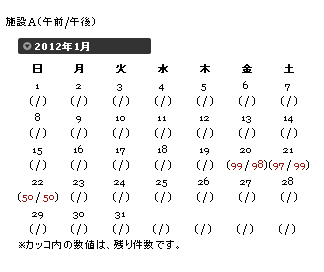
サンプルテンプレート:
<div class="widget-calendar widget">
<h2>施設A(午前/午後)</h2>
<h3 class="widget-header"><$mt:Date format="%B %Y"$></h3>
<div class="widget-content">
<table summary="リンク付きのカレンダー">
<tr>
<th abbr="日曜日">日</th>
<th abbr="月曜日">月</th>
<th abbr="火曜日">火</th>
<th abbr="水曜日">水</th>
<th abbr="木曜日">木</th>
<th abbr="金曜日">金</th>
<th abbr="土曜日">土</th>
</tr>
<mt:Calendar>
<mt:Setvar name="calendar_date" value="">
<mt:CalendarWeekHeader>
<tr>
</mt:CalendarWeekHeader>
<td>
<mt:ignore>↓mt:CalendarIfEntriesタグがないと、mt:CalendarDateやmt:CalendarDayが使えない模様</mt:ignore>
<mt:CalendarIfEntries>
<mt:setvarblock name="calendar_date"><$mt:CalendarDate format="%Y-%m-%d"$></mt:setvarblock>
<$mt:CalendarDay$>
</mt:CalendarIfEntries>
<mt:CalendarIfNoEntries>
<mt:setvarblock name="calendar_date"><$mt:CalendarDate format="%Y-%m-%d"$></mt:setvarblock>
<$mt:CalendarDay$>
</mt:CalendarIfNoEntries>
<br />
<mt:if name="calendar_date">
(<mt:AformReserveIfEmpty aform_id="1" plan="施設A" option="午前" date="$calendar_date"><mt:else><a href="<$mt:BlogURL$>post.html?plan=施設A&option_value=午前&date=<$mt:var name='calendar_date'$>"><mt:AFormReserveQuantity aform_id="1" plan="施設A" option="午前" date="$calendar_date"></a></mt:AformReserveIfEmpty>
/
<mt:AformReserveIfEmpty aform_id="1" plan="施設A" option="午後" date="$calendar_date"><mt:else><a href="<$mt:BlogURL$>post.html?plan=施設A&option_value=午後&date=<$mt:var name='calendar_date'$>"><mt:AFormReserveQuantity aform_id="1" plan="施設A" option="午後" date="$calendar_date"></a></mt:AformReserveIfEmpty>)
</mt:if>
<mt:CalendarIfBlank> </mt:CalendarIfBlank>
</td>
<mt:CalendarWeekFooter>
</tr>
</mt:CalendarWeekFooter>
</mt:Calendar>
</table>
※カッコ内の数値は、残り件数です。
</div>
</div>
応用:残り件数の状態によってカレンダーの表記を「○ △ ×」と出し分けたい
前述のカレンダーでは残り件数を表示しましたが,残数をみて例えば
○ ・・・残数が,しきい値よりも大きい
△ ・・・残数が,0以上,しきい値以下
× ・・・残数が, 0(リンクしない)
と表示したい場合は,例えば次のように書きます。
 <mt:Ignore>
// 残数としきい値を取得して,それぞれ変数remain,thresholdに保存
</mt:Ignore>
  <mt:AFormReserveThreshold aform_id="5" plan="施設A" setvar="threshold" />
  <mt:AFormReserveQuantity aform_id="5"   plan="施設A" option="午前" date="$calendar_date" setvar="remain" />
<mt:Ignore>
// 残数としきい値を比較して,○△×のいずれかを出力
</mt:Ignore>
<mt:If name="remain" gt="$threshold">
        <a href="<$mt:BlogURL$>post.html?plan=施設A&option_value=午前&date=<$mt:var name='calendar_date'$>">○</a>
<mt:ElseIf gt="0">
        <a href="<$mt:BlogURL$>post.html?plan=施設A&option_value=午前&date=<$mt:var name='calendar_date'$>">△</a>
<mt:Else>×
</mt:If>
予約残数をカレンダー表示 についてのお問い合わせはこちら




アークウェブのMovable Typeブログ
新着記事
- 2026年5月20日
Aシリーズ動作確認済み:[重要] Movable Type 9.2.0 / 9.0.8 / 8.8.4 / 8.0.11、Movable Type Premium 9.2.0 / 9.0.8 / 2.16 の提供を開始(セキュリティアップデート) - 2026年4月10日
Aシリーズに影響はありません:Movable Type 9.1.1 / 9.0.7 / 8.8.3 / 8.0.10、Movable Type Premium 9.1.1 / 9.0.7 / 2.15 の提供を開始(セキュリティアップデート) - 2026年1月30日
Aシリーズ動作確認済み:[重要] Movable Type 9.1.0 / 9.0.6 / 8.8.2 / 8.0.9、Movable Type Premium 9.1.0 / 9.0.6 / 2.14 の提供を開始(セキュリティアップデート) - 2026年1月30日
Aシリーズ動作確認済み: [Movable Type クラウド版] Movable Type 9.1.0 / 8.8.2、 Movable Type Premium 9.1.0 / 2.14 リリースに伴うメンテナンスのお知らせ(2月4日実施) - 2025年10月30日
Aシリーズ MT6用プラグイン 販売及びサポート終了のお知らせ

アークウェブはシックス・アパート ProNet Japanのメンバーです。
Movable Typeなどシックス・アパート製品のシステム導入や構築を手がけるパートナー企業のネットワークに参加しています。









